Knowing that an INVITE request is used to create a SIP session is important, but that only paints half the picture. To make sense of SIP, it’s necessary to understand how to use its protocol elements to create a services infrastructure.
Andrew Prokop
SIP Proxy
So, let’s begin with the SIP Proxy. Proxy functionality (stateful and stateless) is defined in RFC3261.
A proxy server relays requests and responses, that means, it accepts request from the UAC, and then forward, or proxy it to the approriate destination, or to another proxy closer to the destination.
A proxy most of the times just acts as a middle man between the client and the terminating server.
A proxy also interprets, and, if necessary, rewrites specific parts of a request, response message before forwarding it.
Stop yawning, I’m going to give you an example. As usual,
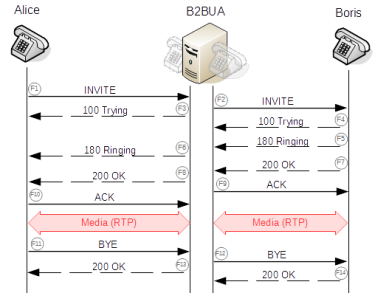
As you can see, all the messages have the same Call-ID header, that means, they’re on the SAME call.
When Caller initiates her INVITE (F1), she puts her location URI into Contact header. Proxy modifies that INVITE (by putting additional Record-Route and Via header), and then forwards it to Callee (F2). Callee accepts that call, and then put his location URI into Contact header in 200 OK response (F3). Proxy forwards 200 OK back to Callee (F4).
Another note, SIP Proxy presents the actual caller in the bottom most Via header to the callee. That behavior is defined in RFC3261, section 16.6.
In this case, later requests within the same dialog, e.g: ACK, BYE are still relayed on Proxy, but it’s not mandatory, since caller/callee knows each other’s location, they could send SIP messages directly. We’ll talk about this in another post, soon.
SIP B2BUA
B2BUA stands for Back-to-Back User Agent. It’s not a standard definition in any RFC, but considered playing roles of both UAS and UAC.
Why would I said that? Because back-to-back user agent operates between both end points of a communication session, and divides the communication channel into two call legs.
B2BUA acts as an UAS in the originating call leg, when receives a call from the caller (UAC), and acts as an UAC in the other leg, by calling the callee (UAS).
So, as you notice, F1 and F8 have the same Call-ID, but they’re different from F2’s and F7’s. That say, F1 and F8 are in the same call, while F2 and F7 are in … hmm, just another call.
That’s the point I want to talk about today, technically, B2BUA consider these two calls are different, but bridged together.
Not like SIP Proxy, no request/response is forwarded from the caller to the callee, or vice versa. When B2BUA receives a message, it creates (or not) a corresponding message, and send it to the bridged call leg. So the endpoints have no idea who’s the actual other endpoint (no footprint on Via, Contact header), because they just communicate to the B2BUA.
That is how topology hiding works.
Okay, that’s enough for today. I hope you’re as thrilled as I am.
Depending on the size of your system and your configuration, Asterisk can consume a large number of file descriptors. In UNIX, file descriptors are used for more than just files on disk. File descriptors are also used for handling network communication (e.g. SIP, IAX2, or H.323 calls) and hardware access (e.g. analog and digital trunk hardware). Asterisk accesses many on-disk files for everything from configuration information to voicemail storage.
Most systems limit the number of file descriptors that Asterisk can have open at one time. This can limit the number of simultaneous calls that your system can handle. For example, if the limit is set at 1024 (a common default value) Asterisk can handle approximately 150 SIP calls simultaneously. To change the number of file descriptors follow the instructions for your system below:
PAM-BASED LINUX SYSTEM
If your system uses PAM (Pluggable Authentication Modules) edit /etc/security/limits.conf. Add these lines to the bottom of the file:
root            soft    nofile          4096
root            hard    nofile          8196
asterisk        soft    nofile          4096
asterisk        hard    nofile          8196
(adjust the numbers to taste). You may need to reboot the system for these changes to take effect.
GENERIC UNIX SYSTEM
If there are no instructions specifically adapted to your system above you can try adding the command ulimit -n 8192 to the script that starts Asterisk.
MORE INFORMATION
See the doc directory for more documentation on various features. Again, please read all the configuration samples that include documentation on the configuration options.
Finally, you may wish to visit the support site and join the mailing list if you're interested in getting more information.
Welcome to the growing worldwide community of Asterisk users!
Mark Spencer, and the Asterisk.org development community
The WWW-Authenticate header consists of at least one challenge that indicates the authentication scheme(s) and parameters applicable to the Request-URI. More...
SIP authentication model based on the HTTP digest authentication described in the RFC 2617
This post is intended to be a neutral in its analysis of the vendors SIP registration process and the various vendors registration responses as analyzed in wire shark using the Conterpath free X lite soft phone. I have to admit that I am not very neutral about Counter path products I think there SIP soft phones are the best to benchmark other SIP phones.
I registered the X lite phone to a Cisco ISR gateway that is enabled as sip registrar, an Avaya Session Manager and for more comparisons a lab Cisco Call Manager and a version 5 Nortel NRS. The IP addresses used in these labs have been changed so that there is no possibility if revealing any proprietary information. You may also noticed paste overs on some of the screenshots, this also to avoid revealing any proprietary information.
You will see how Digest Access Authentication is used the SIP account password will be sent encrypted (normally as md5 hash of the password and some other values) and not sent in clear text.
Two types of SIP authentication that uses Digest authorization with MD5
Registration method
When a SIP User Agent sends Registration Request to SIP Registrar Server it will respond with a 401 Unauthorized with a challenge to provide credentials.
Proxy Authentication of outbound calls (which I will cover in another post)
When a SIP User Agent sends an Invite to a SIP server that will proxy the invite to a SIP Gateway, the SIP server will send back 407 Proxy Authentication Required
A RFC compliant SIP User-Agent will either: 1) Send ACK response to the server response to close the transaction. Or 2) Repeat the initial request and provide additional Authorization (for 401) or Proxy-Authorization (for 407) header in this message. This request must be sent with the same Call-ID and To, From headers as the original one and the CSeq (Command Seq) value must be incremented as seen in the wire shark trace below:
SIP Authentication Headers
The “WWW-Authenticate” header
Used by SIP Registrar Server this header is in the 401 unauthorized challenge for credentials from the User-Agent when the User Agent has made a request for registration
The “Proxy-Authenticate” header( will talk about this in another post)
Used typically when Proxy server is sending request to a gateway that has access to the PSTN network. But it is any call that goes over a SIP trunk to another PBX, Registrar Server that an endpoint exists.
SIP Server (User Agent Server) Challenge Strings
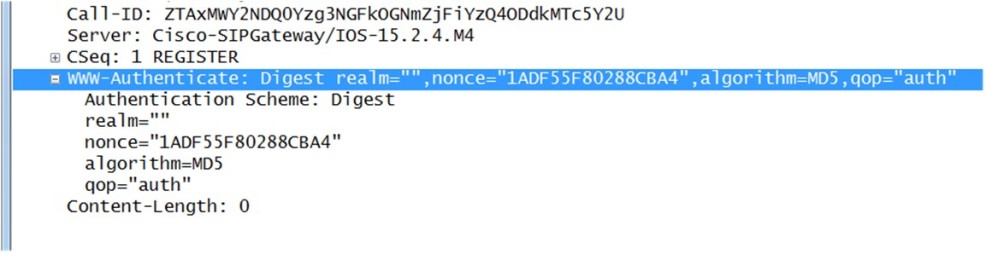
Here is a challenge string taken from a wire shark trace of a Xlite phone registering to a Cisco Gateway: Server: Cisco-SIPGateway/IOS-15.2.4.M4 WWW-Authenticate: Digest realm=””,nonce=”1ADF55F80288CBA4″,algorithm=MD5,qop=”auth”
Here is the analysis of the string which is color coded to match color of text in string:
Challenge type used by the SIP Registrar server is: “WWW-Authenticate”Indicator of Authentication Scheme which is “Digest”Realm is the Protection Domain/or what I call the Dialing Domain ( in this string that I captured from a phone registered to a Cisco gateway no realm was configured)Nonce(Number Once) that can only be used one time. Every 401/407 challenge will contain a unique Nonce whichmeans any data encrypted with it as only good for a single transaction. Those encrypted credentials become completely worthless after a single use.Hash algorithm (which is MD5) qopIndicates what “quality of protection” the client has applied to the message. Typically it is always”auth” or “auth-int”
Challenge from Avaya Session Manager Server: AVAYA-SM-6.3.4.0.634014
Now the Avaya Session Manager string has a few more items in its Challenge string
As with the Cisco Gateway challenge string type is “WWW-Authenticate” This time the realm is defined as it is required in Avaya Session Manager and the realm is “sip.test.com” A new option in the string is opaque=”1234567890abcedef” I find that neither the Cisco Gateway (ISR router) or Cisco Call Manager use the opaque option.
A second new option is “stale” notice in the Avaya SM capture that it is set to true. Typically if the “stale” element is in the string the value will be false. Hold the thought on this will explain why it is set to true in the next section “User Agent Client Response to challenge” opaque A string of data, specified by the server, which should be returned by the client unchanged.( This an extra mechanism that rogue phone would not know when it tried hack the call in progress). The opaque actually makes no sense to me as all Avaya Session Manager captures I have looked at it is always “1234567890abcedef” Stale is either True or false This used to for Server to track when client tries to re-use a Nonce which happens when endpoint Re-registers.
When I tested an old Nortel NRS version 5 it also has an opaque and stale WWW-Authenticate: Digest realm=”sip.lab.com”, nonce=”3f3b346de1b216b59b05daaec5b4b603″, opaque=”62bf8eaf6c0d967565423c4e47a39a8f”, stale=false, algorithm=MD5, qop=”auth”
User Agent Client Response to challenge
Xlite phone response to the challenge from the Cisco SIP gateway
Digest username=”4427″,realm=””,nonce=”63110EC902893319″,uri=”sip:192.168.15.101″,response=”c50963fa128e8db5069e262f176292fe”, cnonce=”a36f404a118bce981fe948ff26be22d4″,nc=00000001, qop=auth,algorithm=MD5 In second Registration request from the User Agent Client (Xlite SIP phone) is the response to the SIP server challenge the: the realm and Nonce are repeated back, then the following new values are added:
username is provided
The SIP URI is supplied
Response contains the encrypted password
CNONCE (Client NONCE) UAC supplied Nonce to effect final hash algorithm
Xlite phone response to Challenge from Avaya Session Manager User-Agent: X-Lite release 4.5.5 stamp 71236 The
Xlite response to the Avaya SM challenge has additional component in the string: NC this is the NONCE count of requests sent by the client and supposedly must be present if qop is present. The nonce-count is used to avoid reply-attacks.
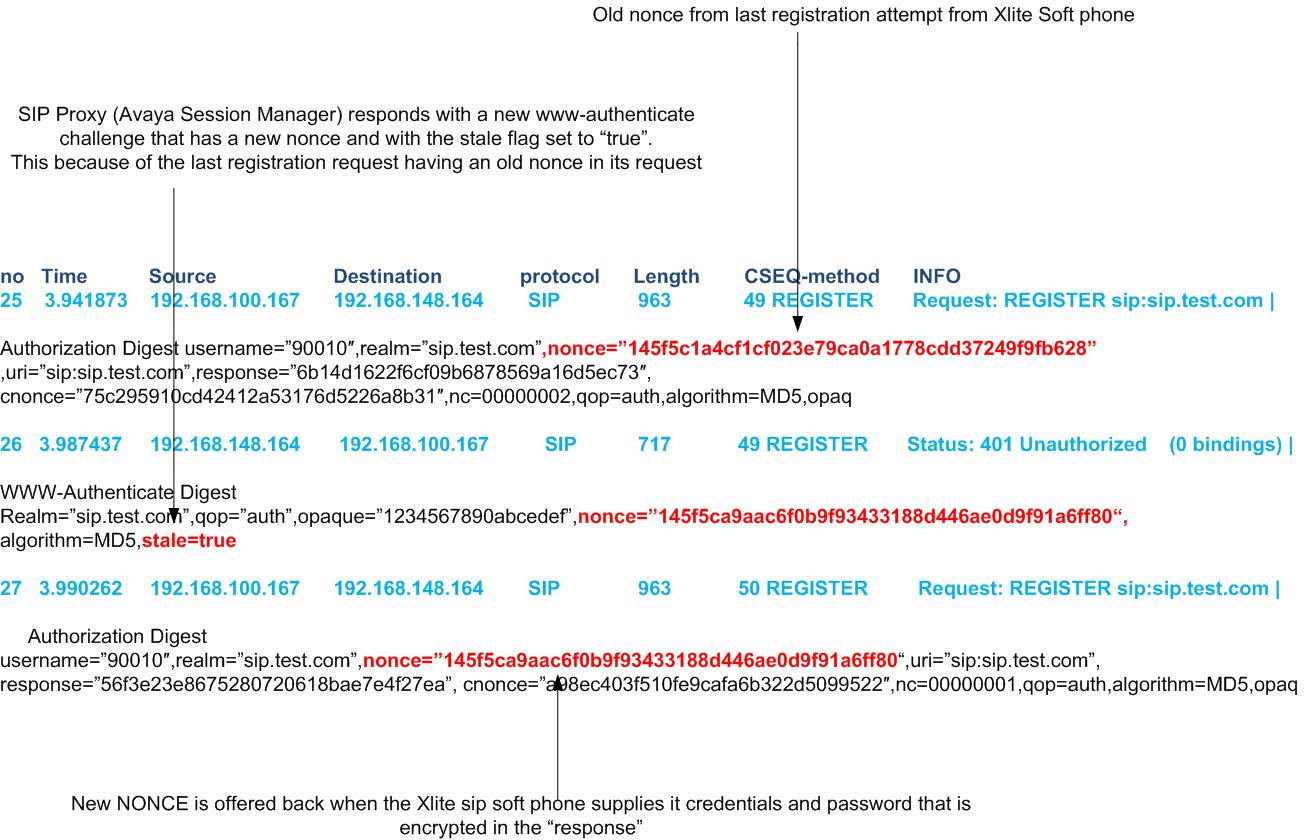
Now to my earlier observation looking at the wireshark snippets below “A second new option is “stale” notice in the Avaya SM capture that it is set to true. ”
WWW-Authenticate: Digest realm=”sip.test.com”,qop=”auth”,opaque=”1234567890abcedef”,nonce=”145f5ca9aac6f0b9f93433188d446ae0d9f91a6ff80″,algorithm=MD5,stale=trueIn this snippet from the wire shark trace we see the Xlite phone (line number 25 and source is 192.168.200.167) initiating a registration attempt with nonce that had been used in a previous registration attempt to Session Manager 192.168.148.164 (destination), notice it is also sending a nc=00000002. This indicates that nonce is being more than one time. Now on line 26 Session Manager responds with a new challenge, notice the nonce value and the stale flag being “true” On line 27 we see that Xlite phone responds to the WWW-authenticate challenge by providing the credentials with the new nonce



 Server: Cisco-SIPGateway/IOS-15.2.4.M4 WWW-Authenticate: Digest realm=””,nonce=”1ADF55F80288CBA4″,algorithm=MD5,qop=”auth”
 The
The